
Route reconstruction
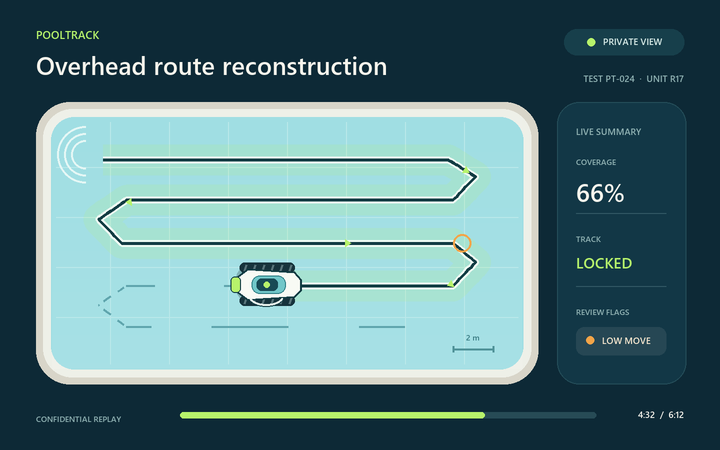
Replay the cleaner’s path with direction markers and gaps where the detector lost the unit. Handheld footage is registered, and weak alignment is disclosed.
Field intelligence for robotic pool cleaners
PoolTrack turns test footage into a clear route over the shape of the pool. Review coverage, camera movement, low-movement areas and unusual travel, with a generic cleaner and coded test names instead of your proprietary design.
Already have an account? Sign in
No password to remember: we email you a one-time code each time you sign in. How it works · See the movement replay ↓

From footage to evidence
PoolTrack combines object detection, temporal tracking and pool-shape mapping. It reports measured observations and confidence gaps, so engineering teams can inspect the evidence behind each result.
Replay the cleaner’s path with direction markers and gaps where the detector lost the unit. Handheld footage is registered, and weak alignment is disclosed.
Build an overhead schematic from the video or a pool photo, for rectangular, round and freeform pools.
Sustained low movement and repeat travel are flagged for a person to check. Reversing is normal and is not treated as a fault.
Download an MP4 replay with the capture time overlaid, or a PDF report to share. Neither contains camera footage. Test code, unit, build and notes stay with every report.
Save a pool’s outline and photo once and reuse it. Compare finished tests side by side.
Record and upload from the PoolTrack iPhone app, with uploads continuing in the background and a notification when your report is ready. The app is in beta.
A simple field workflow
Designed for field testers with a phone or tablet. The heavy video processing runs on PoolTrack’s servers, not on your device.
Record the complete cleaning cycle. A steadier view helps, but slight handheld movement is expected.
The trained detector locates the cleaner frame by frame and records confidence and continuity.
Confirm the pool outline from the video or add a separate pool photo when the boundary is unclear.
Replay the route, jump to review candidates and send a coded report back to engineering.
Getting started
Anyone with an email address can sign up. Signing in works the same way, so there is nothing separate to remember and no password to lose.
Open the PoolTrack dashboard and enter your email address. This is how you create your account and how you sign in.
We send a one-time code to that address, usually within a minute. Type it in to continue. If it does not arrive, check your spam folder and ask for a new code.
The first time only, tell us what to call you and agree to the Terms of use and Privacy policy. Then create your first field test.
Each account sees only its own tests, recordings and reports. You can delete your account and everything in it at any time; see Support.
Plans
No payment details to start. Pro is bought in the iPhone app, so there is nothing to pay for on this website.
Every new account includes 7 days of PoolTrack Pro with no payment details. After that, creating tests, uploading recordings and starting analyses need PoolTrack Pro, a monthly or yearly subscription you buy in the PoolTrack iPhone app. You can always view, download and delete your tests.
Record and upload from your iPhone, with uploads continuing in the background and a notification when the report is ready. The app is in beta (TestFlight) and coming to the App Store.
Request beta accessConfidentiality promise
PoolTrack is designed for confidential manufacturer testing. Goodfield Studio does not publish, sell, disclose or reuse proprietary footage, designs, specifications, model details or test results without written authorisation. Shareable outputs use a generic cleaner, schematic pool and coded identifiers; original footage never appears in them and is deleted automatically after your report.
Start free for 7 days
Create an account to try PoolTrack on your own recordings, or talk to us about a manufacturer or team trial.